
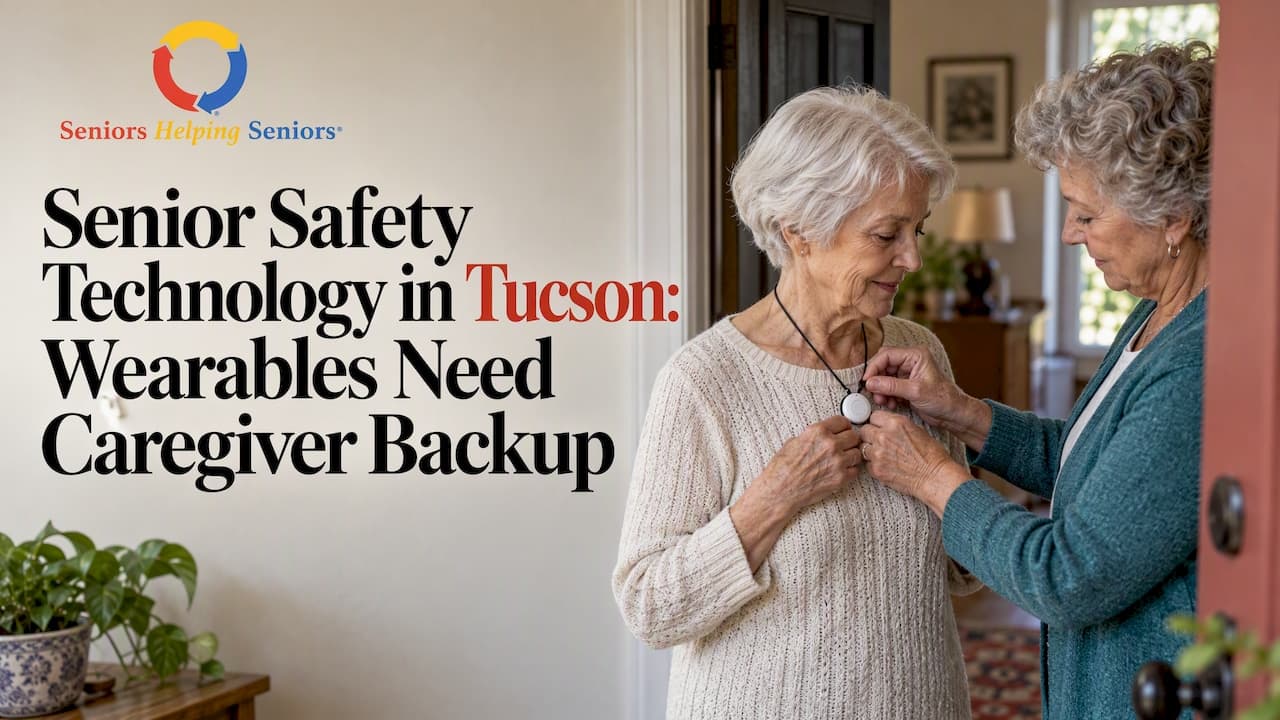
Senior safety technology detects falls and medical emergencies, alerts the right people, and helps older adults stay independent longer, but only when someone actually uses it. The highest-impact starting points are a medical alert or fall-detection wearable, a few smart-home basics, and in-home sensors for high-risk rooms. Start with whichever device your older adult will actually wear or use every day.
TL;DR:
- A medical alert pendant summons help after a fall, while the prescription only airbag belt deploys during impact for people with documented high fall risk.
- Choose a wearable for someone who will reliably wear and charge it; use motion or bed sensors when cognitive decline makes that routine unreliable.
- Test the device for a week, trigger an alert, and check who receives it, whether it escalates to emergency services, and how it handles false alarms.
- Pair alerts with scheduled human visits, because sensors cannot assess mood, appetite, or confusion, and someone must interpret alerts and maintain devices.
- Medicare typically does not cover consumer alert subscriptions; check Medicaid waivers, veterans benefits, and local aging agencies for equipment loans or financial help.
Table of Contents
- What counts as senior safety technology
- Why falls are the problem safety tech is built to solve
- How to choose the right safety device for your situation
- Technology works best alongside human caregiving, not instead of it
- Privacy and consent checks before any monitoring goes in
- What safety technology actually costs, and where to find help paying for it
- Safety technology in residential and long-term care settings
- Pairing Seniors Helping Seniors® Tucson care with the right devices
- When technology helps and when it gets in the way
- Building a safety plan that combines tech and in-home care
- FAQ
- Sources
What counts as senior safety technology
Safety tech for older adults falls into a handful of categories, and matching the right one to the right situation matters more than picking the newest gadget.
Personal emergency response systems (PERS), often called medical alert devices, are the baseline. A button worn as a pendant or wristband connects to a monitoring center or a family member's phone when pressed. Newer versions add automatic fall detection using accelerometers, which can help trigger an alert even if the wearer cannot press the button, though the National Institute on Aging notes these systems only work when worn consistently, charged, and tested.
A newer, clinical-grade category is the wearable fall-injury prevention device. The FDA has created a specific classification for these, 21 CFR 890.3780, covering devices like the Tango Belt that deploy an airbag around the hips the instant a fall is detected. These are prescription-only and sit in a different tier than consumer PERS devices: they're built to prevent injury during the fall itself, not just summon help afterward.
Beyond wearables, several other categories matter:
- Smart-home basics: voice assistants for hands-free emergency calls, video doorbells, smart lighting that reduces nighttime trip hazards, and smart locks that let caregivers check in remotely.
- Ambient sensors: motion detectors, bed or pressure-pad sensors, and floor sensors that flag unusual inactivity or nighttime wandering, particularly useful for cognitive risk or bathroom falls.
- Medication reminder systems: automated dispensers or app-based reminders that cut down on missed or duplicate doses.
- Mobility-assist tools: powered devices and robotics that support transfers and walking, reducing fall exposure during the riskiest moments of a day.
- Facility-grade monitoring: real-time locating systems (RTLS), wireless nurse call, and elopement alerts used in residential and post-acute settings rather than private homes.
Consumer-grade devices (PERS, smart-home gadgets) are built for ease of setup and everyday use. Clinical-grade devices, like the airbag belt, require a prescription and clinician involvement, and they're reserved for people with a documented high fall risk rather than general peace of mind.
Why falls are the problem safety tech is built to solve
Falls aren't a minor inconvenience for older adults; they're a leading driver of emergency care. Each year, falls among older adults in the United States result in substantial numbers of emergency department visits and hospitalizations, according to the CDC. That volume is why so much safety technology exists specifically to detect falls faster and shorten the time someone spends on the floor before help arrives.
The CDC's STEADI framework (screen, assess, intervene) gives clinicians and caregivers a structured way to think about fall risk, and technology maps onto each step. Screening can happen through simple wearable-based balance or gait tracking. Assessment benefits from sensor data that shows patterns, like frequent nighttime bathroom trips, that a single office visit would miss. Intervention is where devices like PERS, fall-detection wearables, and airbag belts come in, by either preventing an injury outright or cutting the delay between a fall and a response.

The CDC's Tele-STEADI guide extends this framework into telemedicine, showing that fall-risk screening and follow-up intervention can happen remotely when paired with the right tools and a community-based follow-up plan. For caregivers, the practical takeaway is that technology supports every stage of the STEADI process rather than replacing clinical judgment at any one of them, and that reducing time-on-floor after a fall is one of the clearest, most measurable benefits a device can offer.
How to choose the right safety device for your situation
The best device isn't the one with the most features. It's the one your older adult will wear, charge, and trust enough to use when something actually goes wrong. Work through these criteria in order:
- Ease of use and adoption. A one-button pendant beats a multi-step app for someone with limited dexterity or vision; voice-activated options help when pressing a button is hard.
- Reliability and false positives. Ask how the device distinguishes a real fall from sitting down quickly, since frequent false alarms lead to alarm fatigue and eventual disuse by both the senior and the family.
- Connectivity and redundancy. Look for cellular backup and on-device detection that still works when Wi-Fi drops, especially in homes with spotty coverage.
- Maintenance demands. Check battery life, charging routine, and whether the device needs a weekly test; a device that dies silently overnight is worse than no device at all.
- Alert pathways. Know exactly who receives an alert first, whether it escalates automatically to 911, and how emergency contacts are ordered.
- Privacy and data handling. Confirm what's collected, how long it's kept, and whether it's shared beyond the monitoring service.
- Cost structure. Decide whether a one-time purchase, a monthly subscription, or a prescription-based rental fits your budget and clinical need.
- Fit for the person and the home. Match the device to the specific risk: a wearable for someone living alone, ambient sensors for someone with cognitive decline who might not wear a pendant reliably.
Pro Tip: Test any new device for a full week before relying on it: have the older adult press the button or trigger the fall sensor on purpose so everyone sees exactly what happens and how fast.
False positives deserve special attention because they're the most common reason families abandon a device. If a fall-detection wearable misfires every time someone sits down hard on a couch, the alerts get ignored, which defeats the entire purpose. The NIA's guidance on home-based emergency services is blunt about this: these systems need to become a habit, not a one-time purchase, with charging and testing built into a routine the same way medication schedules are.
Technology works best alongside human caregiving, not instead of it
A sensor can tell you someone fell. It can't help them up, check whether they're disoriented, or notice that they've been eating less this week. That's why the most effective safety plans pair devices with regular human contact rather than treating tech as a replacement for visits.
A few workflows show how this plays out in practice:
- Wearable plus scheduled check-ins: a fall-detection pendant handles emergencies, while a daily or near-daily companion visit catches the slower-moving problems like dehydration, mood changes, or missed meals.
- Sensor alerts routed to multiple people: motion or bed sensors send notifications to both family members and a home-care agency, so someone is always positioned to respond even if a family member is unavailable.
- Device upkeep folded into visits: caregivers charge the pendant, test the fall sensor, and confirm Wi-Fi connectivity during a scheduled personal care or companion visit instead of leaving it to the older adult alone.
- Clear division of labor: family members handle emotional check-ins and medical appointments, while a home-care provider or agency handles the routine physical safety tasks, like making sure grab bars are in place after a housekeeping visit.
An ACL report on AI in home care backs this up directly: AI-enabled sensors and monitoring tools can support home care workers by continuously watching for risk patterns, but they still require human oversight, and they can generate false positives that need a person to interpret. The same report flags connectivity gaps and equity concerns, meaning a tech-only safety plan will leave some households underserved no matter how good the device is. Assigning clear roles, who tests the device, who responds to an alert, who documents an incident, cuts down on both alarm fatigue and response delays.
Privacy and consent checks before any monitoring goes in
In-home monitoring means a record of someone's movements, sleep, and bathroom habits sits somewhere outside the home, and that deserves a real conversation before installation, not after.
Before choosing a device or service, ask the vendor these questions directly:
- What specific data is collected, and in what format (video, motion events, timestamps)?
- How long is that data retained, and can a family member delete it on request?
- Is data ever used for purposes beyond safety monitoring, like marketing or product development?
- Is data shared with third parties, and if so, which ones and under what terms?
Where it's available, choose local processing over constant cloud uploads, and look for sharing controls that let the older adult or their family decide who sees what. Research from the FTC's PrivacyCon on smart-home privacy preferences found that people are generally comfortable with data flows tied directly to safety, but much less comfortable when that same data gets reused for other purposes, and that transparency and control meaningfully increase comfort with monitoring.
Consent gets more complicated when the older adult has cognitive impairment. In those cases, loop in a power of attorney or the person's physician before installing cameras or continuous sensors, and revisit the conversation periodically rather than treating one early approval as permanent.
Pro Tip: Set a unique password and enable multi-factor authentication on every connected safety device the same day you set it up, since shared or default passwords are one of the easiest ways a monitoring system gets compromised.
A few quick fixes close most of the gap: unique passwords per device, multi-factor authentication where offered, and limiting cloud backups to only what's necessary for the alert system to function.
What safety technology actually costs, and where to find help paying for it
Pricing shapes vary more than people expect, and knowing the common patterns helps avoid surprises.
- Device plus monthly subscription: most consumer PERS and fall-detection wearables bundle a device fee with an ongoing monitoring subscription, billed monthly.
- Prescription devices: clinical-grade options like wearable fall-injury prevention devices require a clinician's prescription and are priced and billed differently from consumer gadgets.
- Short-term rental: some agencies and medical supply companies offer rental programs for a device needed only during a high-risk period, such as recovery after a hospital stay.
Medicare typically does not cover the ongoing subscription cost of a consumer emergency alert system, which catches many families off guard. It's worth checking Medicaid waiver programs, VA benefits for eligible veterans, and local Area Agencies on Aging, which sometimes maintain grant programs or equipment loan closets for exactly this purpose. Families navigating Medicare Advantage, Medigap, or other coverage questions around long-term care costs can get a clearer picture of what's and isn't covered through resources like this guide to Medicare and long-term care costs.
The most budget-friendly approach is to start with a low-cost, low-friction option, a basic PERS pendant or a couple of smart plugs for lighting, and add clinical-grade devices only if a doctor identifies a specific, documented fall risk that justifies the added cost and prescription process.
Safety technology in residential and long-term care settings
Facilities use a different tier of safety technology than private homes, built for monitoring many residents at once rather than a single household.
Real-time locating systems (RTLS) track resident location throughout a building, which matters most for elopement risk in memory care units. Wireless nurse call systems replace the old pull-cord with something residents can trigger from anywhere in their room, and bed or pressure sensors alert staff the moment someone with a fall history tries to get up unassisted.
When evaluating a facility or asking about its systems, a few questions cut through marketing language:
- Does the monitoring system integrate with the facility's nurse call system and electronic health records, or does it run as a separate, disconnected tool?
- What's the facility's documented response time once an alert fires, and how is that measured?
- How does staff get trained on the system, and what's the process for managing false alarms so real ones don't get lost in the noise?
- What privacy safeguards exist around camera or sensor data, and has the resident (or their representative) consented to the specific monitoring used?
A facility that can answer these clearly, with specifics rather than general assurances, is usually the one actually using its technology well rather than just advertising it.
Pairing Seniors Helping Seniors® Tucson care with the right devices
Technology works better when a person is woven into the routine around it, and that's where our approach fits. Caregivers can help build the daily and weekly rhythm that keeps a device from becoming an afterthought: charging it, checking that it's worn, and noticing when something's off long before a sensor would flag it.
A workflow that works well in practice: a wearable fall detector handles the emergency moment, a nightly companion visit checks in on mood, meals, and general well-being, and a couple of home-safety spot checks each week confirm the device is actually being worn and that pathways around it, like the route from the bed to the bathroom, stay clear. Our light housekeeping and meal support visits often double as a natural moment to test an alert button or confirm a sensor is still working.
Medication reminders fit the same pattern. A dispenser can beep, but a caregiver who is already in the home for a scheduled visit can confirm the dose was actually taken, not just that the alarm went off. When setting up a safety plan, caregivers can help walk through practical questions: who charges the device, who spot-tests the alert monthly, and who writes down what happened if it ever goes off for real.
When technology helps and when it gets in the way
My honest view, after looking at how these devices perform in real households, is that safety technology is a force multiplier for good care, not a substitute for it. A fall-detection pendant genuinely shortens the time between an emergency and a response, and that gap matters enormously given how many falls lead to hospitalization. But a sensor network in an otherwise empty house just produces faster notifications of problems that better daily contact might have prevented in the first place.
I'd lean toward human check-ins over automation whenever the goal is catching slow-developing issues, like withdrawal, confusion, or appetite loss, since no current sensor reads those well. I'd lean toward tech when the risk is sudden and physical, like a fall or a medical event, where seconds matter and a person can't always be in the room.
Two trade-offs are worth sitting with honestly: privacy against reassurance, since every camera or sensor that makes a family feel safer also records something the older adult might not want recorded, and independence against supervision, since the more monitoring you add, the more a home starts to feel observed rather than lived in.
— Cameron
Building a safety plan that combines tech and in-home care
If you're putting together a safety plan right now, the technology side is only half the picture. The other half is who's actually in the home to notice what a device can't catch, and that's where our services are built to help. We offer Companion Care for the daily and weekly check-ins that keep someone from feeling monitored instead of supported, Medication Reminders paired with an actual person confirming the dose went down, and Light Housekeeping & Meals visits that double as a natural time to test a fall sensor or straighten a loose rug.
For someone coming home after a hospital stay with a new fall risk, our Return Home Transitional Care service is built specifically for that short-term window when safety needs are highest and a device alone isn't enough.
Caregivers are matched with clients based on compatibility and shared life experience, and services may be offered with flexible terms, so a safety plan can start small and grow if needs change.
- Companion Care: daily or weekly check-ins that catch what sensors miss.
- Medication Reminders: a real person confirming doses, not just an alarm.
- Light Housekeeping & Meals: routine visits that double as safety spot-checks.
- Return Home Transitional Care: focused support during the highest-risk recovery window.
Reach out through our full list of in-home services to talk through a safety plan that fits your situation, or ask about scheduling a home-safety visit alongside the services above.
FAQ
Does Medicare cover medical alert systems or fall detection devices?
Medicare typically does not cover the ongoing subscription cost of a standard consumer medical alert system. It's worth checking Medicaid waiver programs, VA benefits, or your local Area Agency on Aging, since coverage and assistance programs vary by state and eligibility category.
How accurate is automatic fall detection on wearable devices?
Automatic fall detection can miss some falls or misfire on sudden movements like sitting down quickly, which is why the NIA notes these devices need consistent wearing, charging, and testing to work as intended. No consumer device replaces a manual help button as the most reliable way to call for help.
What's the difference between a medical alert pendant and a wearable airbag belt?
A medical alert pendant calls for help after a fall happens, while a wearable fall-injury prevention device, like the airbag belt the FDA classified under 21 CFR 890.3780, deploys protection during the fall itself to reduce hip injury. The belt is prescription-only and intended for people with a documented high fall risk.
How can families reduce privacy risks with in-home monitoring?
Ask vendors exactly what data is collected, how long it's kept, and whether it's shared with third parties before installing any device. Choosing local-processing options where available and setting unique passwords with multi-factor authentication on each device cuts down on the most common security risks.
Can safety technology replace in-home caregiving visits?
No single device replaces the judgment of a person checking on mood, appetite, and overall well-being, which sensors generally can't measure. The ACL's analysis of AI in home care found that monitoring tools work best as support for caregivers, not as a stand-in for human visits.
Sources
For readers who want to verify the figures and guidance referenced throughout this piece, these are the primary sources:
- Centers for Disease Control and Prevention — Falls data & research
- Administration for Community Living — Reimagining home care work with AI
- FDA De Novo order — wearable fall injury prevention device (Tango® Belt)